How to Organize Blog Categories on Your Website
Something that’s often overlooked or not given much thought to is how to organize blog categories as a business owner.
As you publish more blogs on your website, a good category structure becomes necessary to keep your content organized. It also helps you stay on topic and ensure that the posts you’re writing actually support your business.
Let’s talk more about the importance of blog categories and what you need to know when setting them up.
Blog Categories vs. Tags
This is something I often see people getting confused about, so let’s quickly clear it up:
Blog categories are the broader buckets (AKA pillars) of content your blog will cover. Every blog post you write should fall under one of these categories.
EXAMPLE: A brand designer’s blog categories could include Brand Identity, Brand Messaging, and Marketing
Blog tags are more specific groupings that describe details of a post. They can be useful if you’re doing a blog series or want to keep track of posts on a more focused topic than your broad categories.
EXAMPLE: Using the same example as above, under the category “Brand Identity,” tags could include things like Logo Design, Color Psychology, and Typography
Generally, I recommend ignoring blog tags in the beginning. You just don’t need tags until you have a large bank of content where having that next level of organization would be useful. For the majority of business owners, sticking with just categories is enough blog structure.
How Categories Improve Your SEO & User Experience
Blog categories enhance your website’s structure by grouping relevant topics together. This helps Google better crawl and understand what your site is about.
The more blogs you publish and internally link between in a specific category on your site, the more Google will start to see you as an authority on that topic. This helps you build topical relevance, which improves your SEO over time.
Sooo, that’s the “technical” reason blog categories are so useful, but they’re also just as great for your readers.
Instead of landing on your blog and having to click through dozens of posts to find something relevant to them, readers who land on your blog can use your category structure to navigate to the content they want to read.

This can decrease your website’s bounce rate, which ALSO has a positive effect on your SEO. So, having organized blog categories is really a win-win all around.
Organizing + Setting Up Your Blog Categories
If you’re not sure where to begin when it comes to setting up blog categories for the first time, stick to a couple at first and add more as needed.
Ideally, they should be related to your main areas of expertise as a business owner and what products/services you offer.
For example, as a longform content strategist and blog writer, my categories are:
- Blogging
- Content Repurposing
- Marketing
- Entrepreneurship
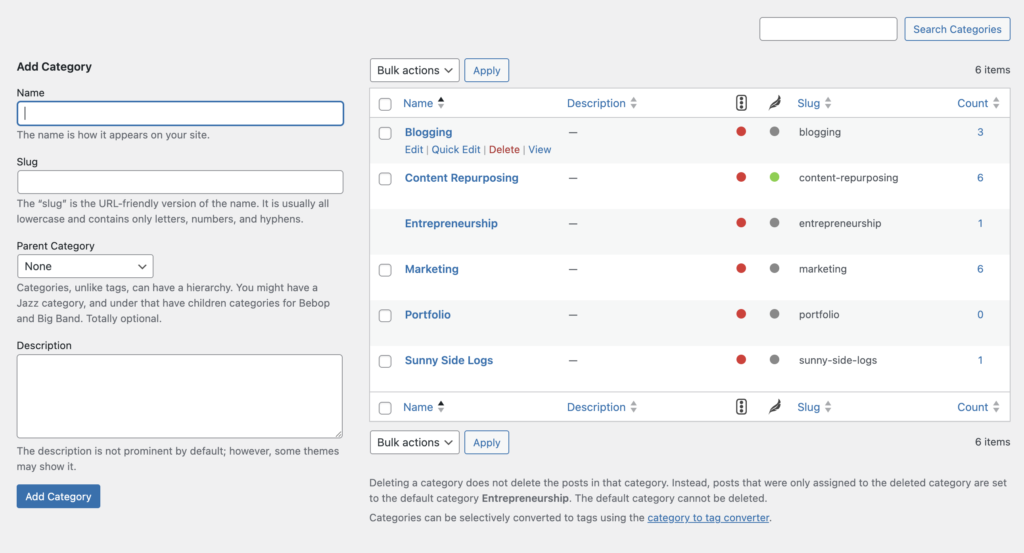
I also have a “Portfolio” category for sharing case studies as well as a personal category, “Sunny Side Logs,” that acts as a catch-all for anything else I might want to share.
Categories in WordPress/Showit
Setting up categories for WordPress (self-hosted) and Showit websites follows the same steps since Showit integrates with WordPress for blogging.
- Open your WordPress dashboard and hover over Posts on the left-hand menu. Then click Categories.

- Set up new categories on the left. On the right side of the page, you’ll see all of your existing categories – hover your mouse over a category to make updates as needed.
Categories in Squarespace
Managing categories in Squarespace is also relatively simple, but the process differs depending on whether you’re trying to ADD categories or EDIT categories.
To add a new blog category:
- Navigate to the Pages panel in your Squarespace account, then click into your Blog.
- Scroll down to your list of published posts and click the three dots next to one of your blogs.
- Go to Settings → Options → Categories and type in the new category you want to add.
To edit your existing blog categories:
- Navigate to the Pages panel in your Squarespace account, then click into your Blog.
- Click the Settings icon on the right side of your blog name, then go to Advanced → Manage Categories.
- Click the checkbox beside a category to make edits or delete it.
How Many Categories Should You Have?
There’s no hard and fast rule here, but I recommend having at least 4-5 blog categories, but no more than 7.
If you have more than 7 blog categories, you’re probably getting too specific with them. This can make it difficult to actually fill those categories with posts, and thin category pages can actually hurt your SEO.
Similarly, having only 1 or 2 blog categories signals you’re going too broad and your content pillars need a tighter focus.
Common Mistakes to Avoid With Blog Categories
- Creating categories you can’t fill: You really don’t want to have any blog categories with no posts or very few posts (I’d say less than 5).
- Adding categories unrelated to your business: If you’re a brand designer, a “Recipes” or “Crafts” category is confusing to readers and won’t help you grow your business. You can have a “Personal” category or similar if you want, but try to keep the rest relevant to what you do/offer.
- Fun category names that are hard to understand: Creative/clever names are cool, but can hurt the user experience. Your category names should be clear and easy to understand for readers AND search engines.
- Using categories like tags: Categories are like the broad strokes of what your blog is about, not hyper-specific to each post.
It’s Time to Set Up Your Blog Categories!
Blog categories enhance your website structure, boost SEO, and create a better reading experience for readers. So don’t neglect them when you start blogging for business!
Blog categories should be broad and relevant to your business, but don’t stress too much about getting them perfect right away. You can always change them later as your business shifts and grows.
Still need more help? Category setup is included in all my blogging retainer packages!
FAQs About Blog Categories
Can a blog post go in more than one category?
A blog post can go in more than one category, but absolutely no more than two. Generally though, it’s best to stick to one category per blog post. Sometimes the topic of a blog will overlap and fit into multiple categories, but if this is happening frequently, it’s a sign that your categories are too broad.
Should I use subcategories?
For the majority of creatives and small business owners, using subcategories simply isn’t necessary. Unless you’re publishing dozens of blog posts each month, you’re probably not going to have enough content to fill them out. For the average blogger, it doesn’t really make sense to use them.
Can I delete a blog category from my website?
You can delete a blog category from your WordPress, Showit, or Squarespace website. The posts under that category will stay on your website, so you’ll need to recategorize them to fit your new blog category structure.
You May Also Like